The Simple Timesheet mobile app is here, on iOS and Android
Our biggest release yet: a free native app that lets your team log hours in ten seconds, from anywhere, with instant sync to the web app.

Short answer
Can I track my working time from my phone with Simple Timesheet?
Yes. Simple Timesheet now has a free native mobile app on iOS and Android. You sign in with your existing account, log a day in about ten seconds, and everything appears instantly in the web app for dashboards, approvals and exports.
Key takeaways
- The app is free on the App Store and Google Play, and included in the free plan for up to 10 users.
- Logging a day takes around ten seconds thanks to duration shortcuts of 30 minutes, 1, 2 and 4 hours.
- It is the same account and the same data as the web app, so nothing needs to be migrated or reconciled.
- There is no GPS tracking, no keystroke logging and no screenshots: time entry stays declarative.
Why we built a mobile app
Time tracking fails for one boring reason: people log their hours too late. When a timesheet is filled in on Friday afternoon for the whole week, the numbers become an approximation, and every report built on top of them inherits that approximation.
The teams using Simple Timesheet told us the same story again and again. Consultants on client sites, technicians in the field and managers between two meetings all wanted to record their time at the moment the work happened, not once they were back at a desk. That is exactly what the mobile app is for.
Your week, on one screen
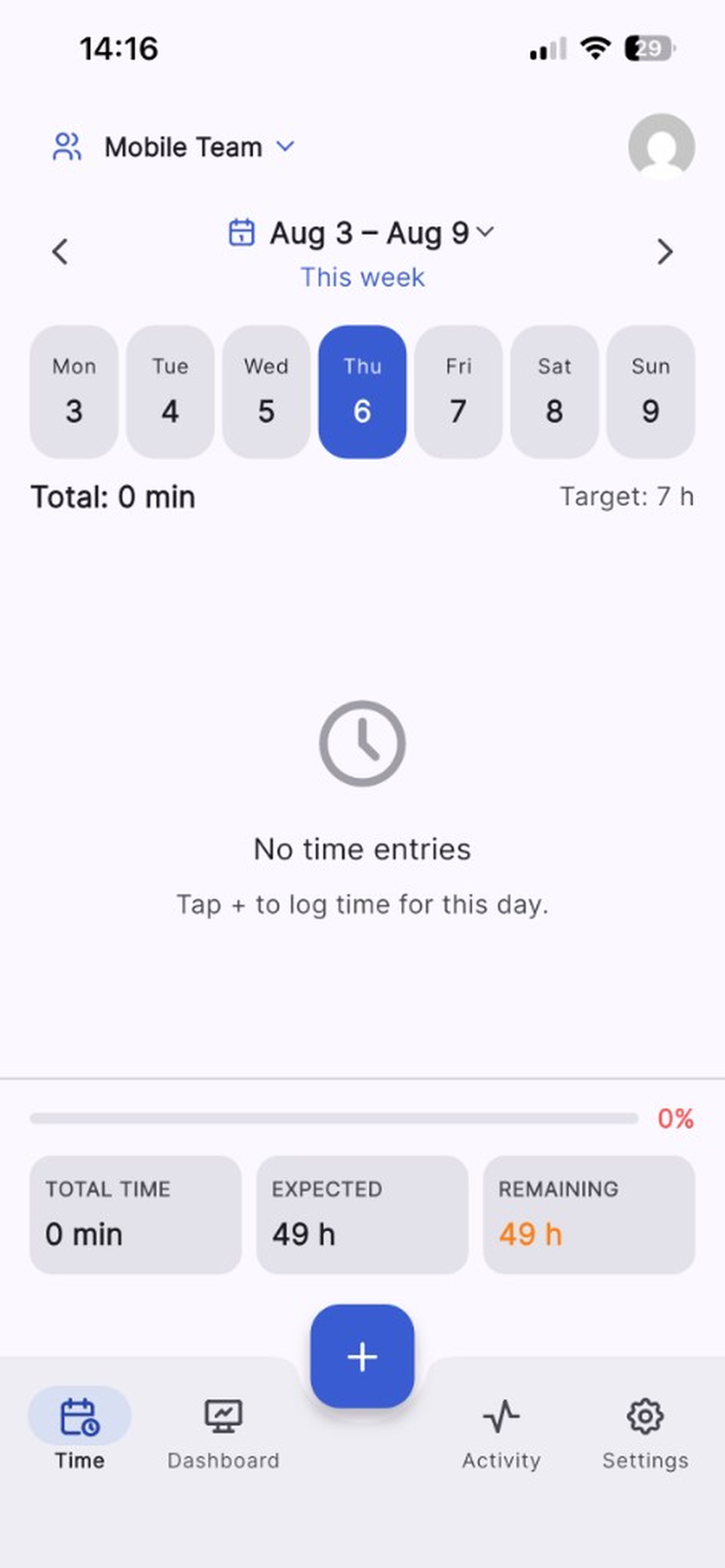
The app opens on the current week. Days sit in a row at the top, your total for the selected day is right underneath, and the target hours are displayed next to it so you always know where you stand.
At the bottom of the screen, a progress bar compares your total time against what is expected and shows the remaining hours. Nobody has to open a report to find out whether something is missing.
Ten seconds to log a day
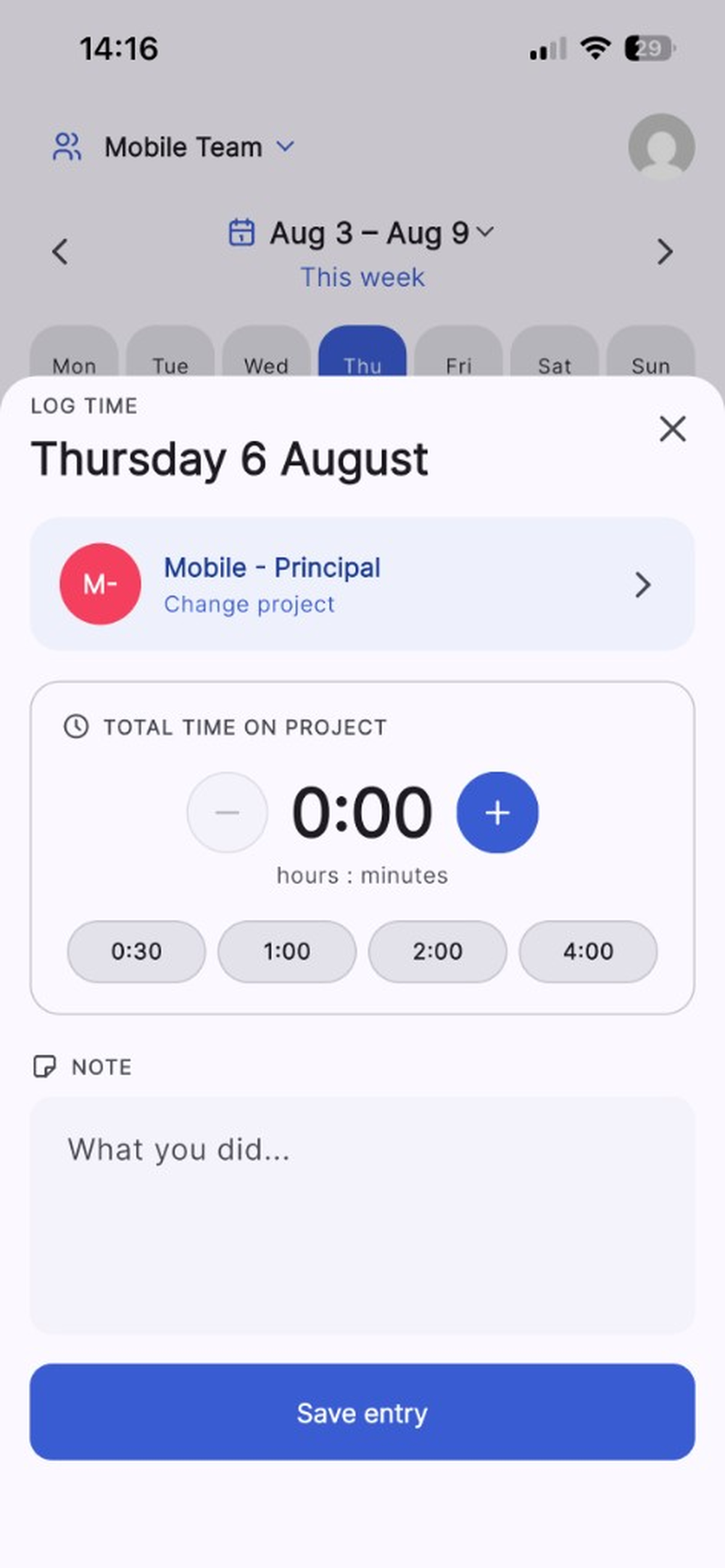
Tap the plus button, and the entry sheet slides up with your current project already selected. Duration shortcuts cover the most common cases, the plus and minus buttons handle everything else, and a note field records what you actually did.
That is the whole interaction: pick a duration, add a note if it is useful, save. No timer to start and forget, no dropdown hunting, no keyboard gymnastics on a small screen.
- Shortcuts for 30 minutes, 1 hour, 2 hours and 4 hours
- Fine adjustment with plus and minus, in minutes
- A free-text note per entry, so context is not lost
- Project switching in one tap, most recent projects first
One account, one source of truth
The app is not a separate product with its own data. You sign in with the credentials you already use on the web, including multi-factor authentication if you have enabled it, and your teams, projects and permissions follow you automatically.
Every entry logged on a phone is immediately visible in the web dashboards, included in Excel exports and available through the API. Managers keep working exactly where they were working before.
Declarative by design
Plenty of mobile time tracking apps double as surveillance tools, with location tracking, activity monitoring or periodic screenshots. We deliberately did none of that.
Simple Timesheet records what your team declares, nothing more. That is what makes adoption possible: people fill in a timesheet willingly when it takes ten seconds and does not follow them around.
How to get started
If your team already uses Simple Timesheet, install the app from the App Store or Google Play and sign in. There is nothing to configure.
If you are new, create a free account on the web first, add your projects and invite your team, then let everyone install the app. The free plan covers up to 10 users forever, with no credit card required.
Install the app and log your first day in ten seconds.
Frequently asked questions
Is the mobile app free?
Yes. The download is free on both stores, and the app is included in the free plan that covers teams of up to 10 users. Larger teams pay €2 per user per month for the whole product, app included.
Which devices can run the app?
The iOS app works on iPhone and iPad with iOS 15 or later. The Android app is available on Google Play for recent Android phones and tablets.
Does the app replace the web application?
No, it complements it. The app is designed for fast time entry and personal follow-up, while team dashboards, approvals, analytics and exports stay in the web app.
Do mobile entries need to be re-entered on the web?
Never. The app and the web application share the same account and the same database, so an entry logged on a phone is instantly part of your team reporting.
Keep reading

How to track time in a small team without micromanaging
Time tracking gets rejected when it feels like surveillance. Here is how small teams introduce it as a planning tool instead, and get accurate data within two weeks.
6 min read
How to calculate billable hours and utilization rate
The two numbers every service business should know, with the formulas, a worked example and the mistakes that make them lie.
6 min read
Excel timesheets versus time tracking software: when to switch
Spreadsheets are a legitimate starting point. Here are the five signals that tell you they have become more expensive than the tool you were avoiding.
5 min readPut this into practice, for free
Simple Timesheet is free forever for up to 10 users. Create your team, add your projects, and log your first hours in three minutes.
No credit card required